Lesson 5

Controlling Your Camera

Manual controls, focus, exposure lock, ISO, and third-party app choices for more reliable smartphone results.

Automatic mode is useful until it changes the frame at the wrong time. Control is not about making the phone complicated. It is about deciding which settings should stay stable while the subject, light, or camera moves.

Lock what needs to stay consistent

For photos, focus and exposure lock are usually enough. For video, consistency matters more: exposure, white balance, frame rate, and focus can shift while recording. A third-party camera app can help when the default camera keeps making decisions you do not want.

  • Lock focus when the subject distance is not changing.
  • Lock exposure when brightness changes would distract from the subject.
  • Keep ISO low when possible to avoid noisy files.
  • Use manual apps when the default camera will not hold the settings you need.

Primary teaching tool

Camera control priority panel

Use this panel to separate what to lock, what to leave automatic, and what to test before the real take starts.
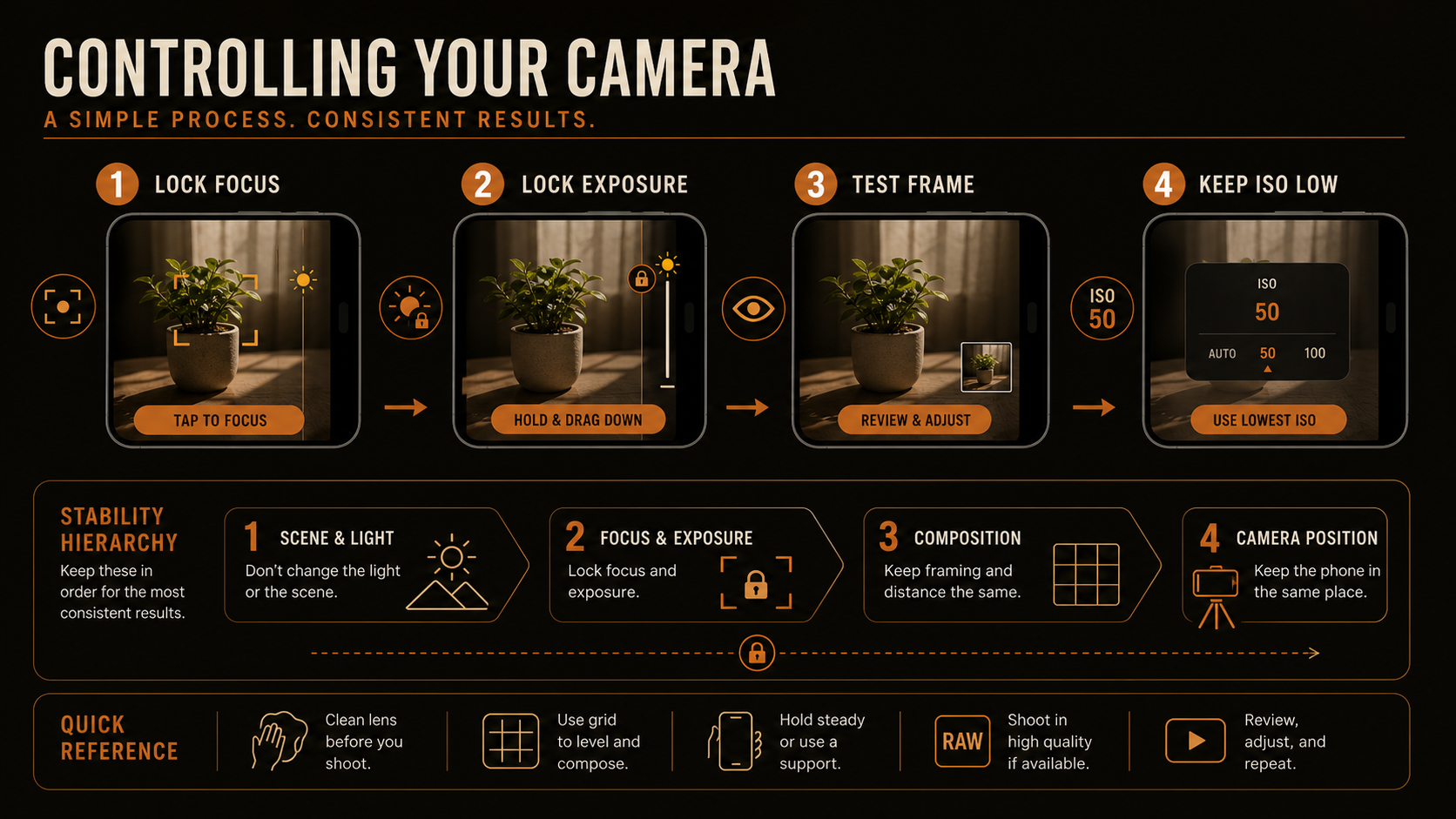
Camera control priority panel

Field checklist

Set the camera, make a test frame, review it at full brightness, then shoot the real take. A thirty-second check can save an hour of editing.

Lesson handoff

After the controls are stable, use field habits that keep the workflow fast and repeatable.

Lesson examples

Reference examples

Use these references to clarify what to lock, what to leave automatic, and how to keep the phone stable from test frame to final take.

Lesson example / PNG / lesson card reference

Camera control reference panel

Use this reference to keep the control sequence simple: settle focus, check exposure, test the frame, then protect ISO stability before the real take.

Lesson example / PNG / focus lock

Focus lock confirmation

Use this system view to confirm what a settled focus decision should feel like before you commit to the take.

Lesson example / PNG / stability and noise

ISO stability and noise

Use this reference to see why unstable low-light capture pushes the phone into noisier rescue behavior.

Lesson example / PNG / stability hierarchy

Focus, exposure, and ISO stability hierarchy

Use this panel to prioritize what needs to stay stable once the test frame looks right.

Additional example / PNG / control chain

Control chain

Use this technical chain when you need to see the whole order of operations from subject choice to review.

Additional example / PNG / ISO compensation

ISO noise compensation

Use this exploder when you need to explain how weak light turns into boosted, dirtier image output.